How we increased efficiency for 100+ sales reps through a scalable CRM
Manual workflows failed to scale for speed, consistency, and trust—prompting the design of core internal platforms that reduced overhead and enabled efficient operations.
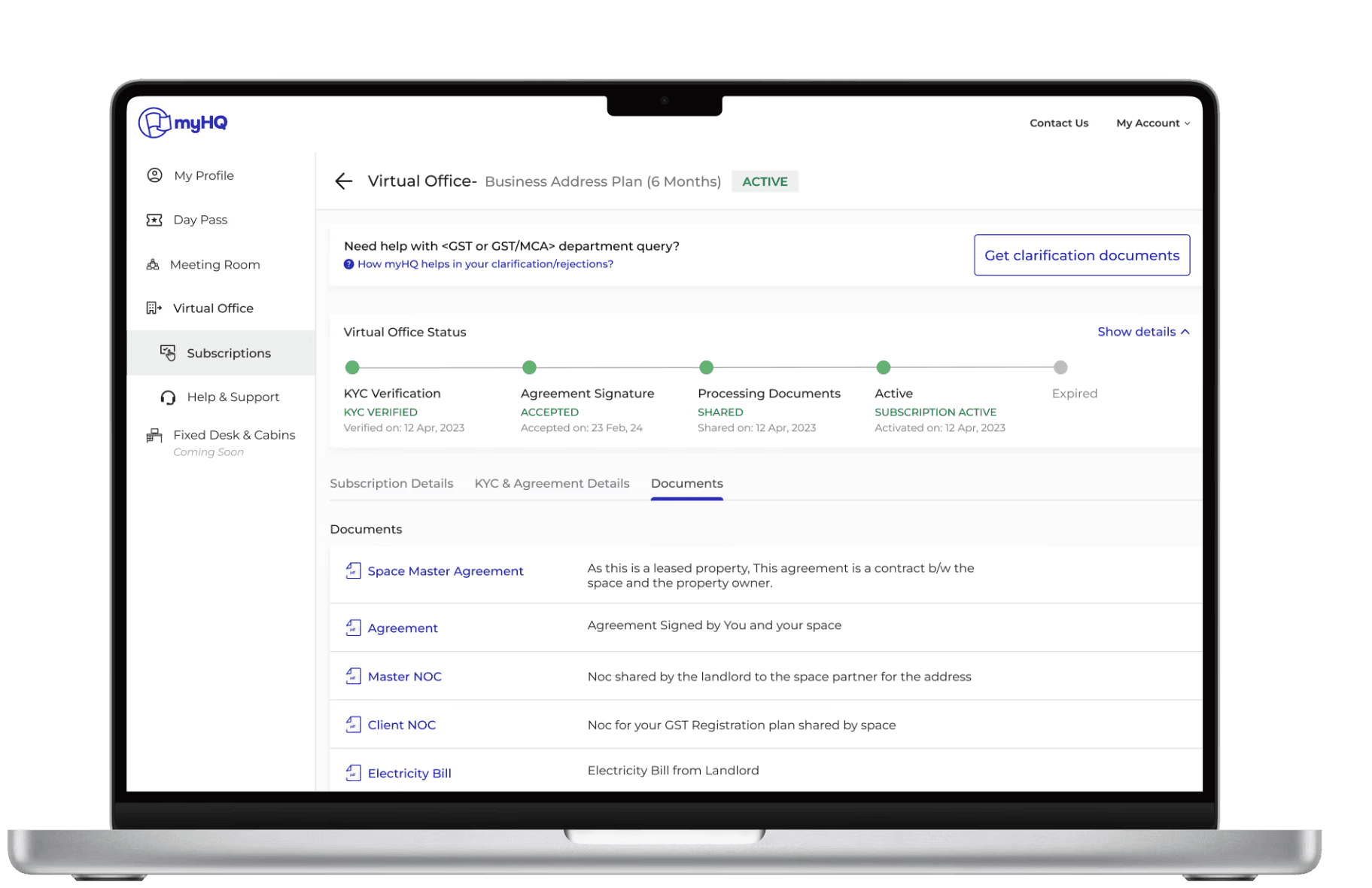
Project overview
myHQ operates in the B2B workspace ecosystem, offering flexible office solutions across multiple cities and product categories—serving SMBs to large enterprises.
As myHQ scaled, the sales team began handling multiple leads daily across cities and product lines. While Zoho was used for basic lead capture, most tracking, follow-ups, and performance monitoring relied on calls, emails, spreadsheets, and manual coordination.
At the same time, myHQ already had a powerful Admin dashboard—its internal data management system—used to manage workspaces, inventory, users, and city-level operations through CRUD workflows. However, lead management lived outside this system, creating gaps between sales activity and operational visibility.
My Role
Product Design · Design thinking · Journey Mapping · Prototyping · Usability testing · CRM & System Design
Timeline
4 weeks (MVP for 0->1 flow)
Interface
Web dashboard (Admin)
Pod
1 Product manger, 1 Product designer, 2 Engineers
myHQ's sales team
At myHQ, the sales team manages the entire client journey—from workspace shortlisting and site visits to partner negotiations, booking, and move-in support.
To handle scale across cities and products, the team operates in a four-tier structure:
PnL head – Cross-team coordination, System operations, data integrity, and platform configuration
Regional Leads – Monitor performance, conversions, and bottlenecks across multiple cities/regions
City Leads – Manage sales associates, partner coordination, and deal progression
Sales Associates – Handle daily lead follow-ups, client interactions, and closures

A centralized CRM and lead-management system would provide visibility across all levels
Understanding the current system- Research & Mapping
The Sales team identified growing delays and inefficiencies in internal communication due to the absence of a standardized way for regional managers to track leads and monitor their progress across stages. As lead volumes increased across cities and product lines, visibility into conversions, ownership, and performance became fragmented and reactive.
Stakeholder interviews 👥
User interviews
Spoke with recent Virtual Office purchasers & uncovered confusion around next steps, timelines, and compliance expectations
“I was unsure if all documents will be provided"
“I didn’t know what happens after payment”
“I kept following up to understand next steps”
“Too many scattered documents sent & received”
Sales rep interviews
Interviewed 8 member of sales to know real onboarding workflows & identified manual handoffs, delays, and workarounds across stages
“Every deal needs hand-holding across stages”
“Explaining the same compliance questions repeatedly”
“Data is scattered across tools and conversations”
“Post-payment confusion leads to escalations”
Support query analysis (~200) 💬
Reviewed recurring user and ops queries using ChatGPT & Perplexity & identified patterns and breakdowns in the journey.
“What documents will I receive?”
“What documents are required after payment?”
“How long does activation actually take?”
“Why was my agreement rejected?”
Workflow mapping 🔄
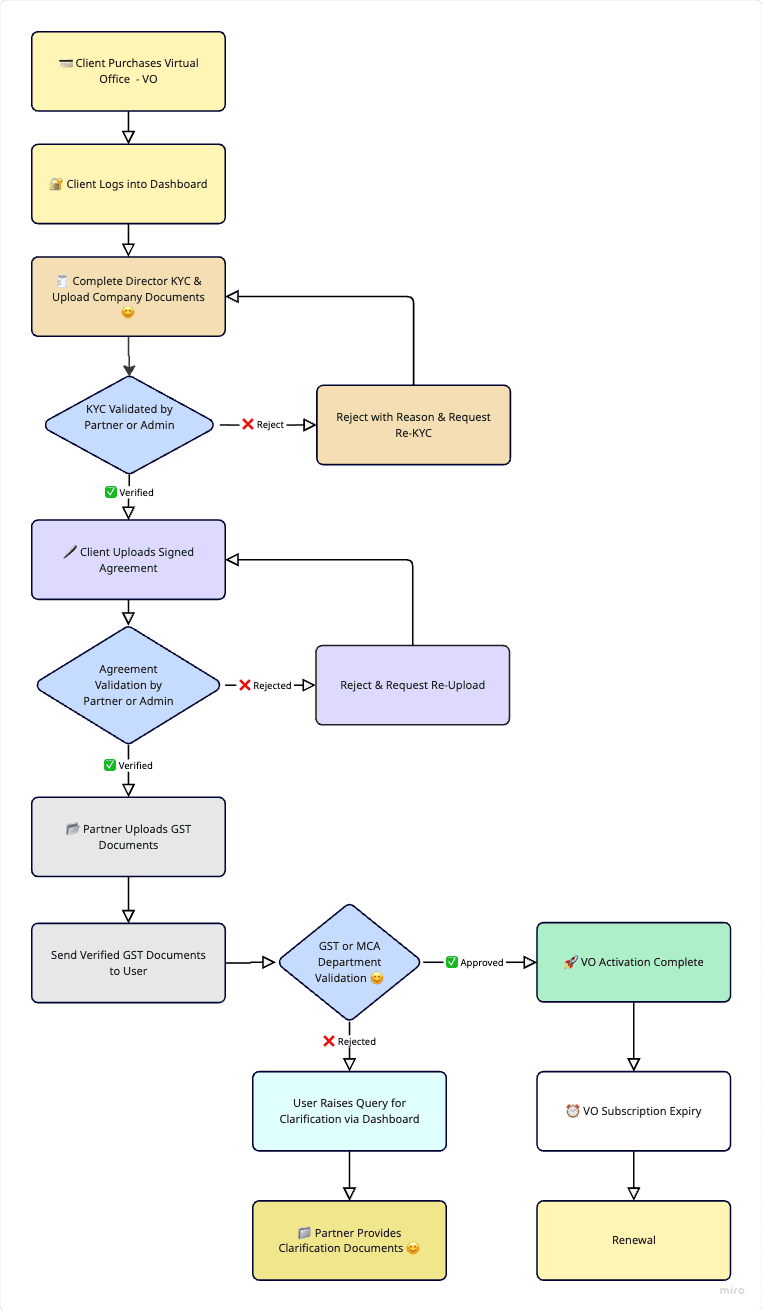
Journey mapping from lead capture → payment → KYC → agreement → document dispatch to expose friction points and handoff failures.
Manual handoffs at every stage caused delays
Payment confirmation was fully manual
Users lost visibility immediately after payment
Progress driven via WhatsApp & email
Internal tool audit 🔍
Reviewed spreadsheets, email threads, and WhatsApp flows & map how ops tracked progress without a unified system
Progress tracked via spreadsheets and email chains
WhatsApp/calls/ manual emails used for reminders and clarifications
No single source of truth for onboarding status
High risk of missed follow-ups and errors
End-to-end journey mapping 🔍
Mapped the complete lifecycle: Payment → KYC → Agreement → Clarifications → Activation & highlighted friction points, ownership gaps, and drop-offs
Uncertainty about documents & TAT caused anxiety among clients
Manual tracking caused overload and burnout among ops & sales
Sales' Focus on new conversions was blocked/delayed
Management of multiple client documents was inefficient.
Challenges & solutions
👀
Lack of transparency & guidance
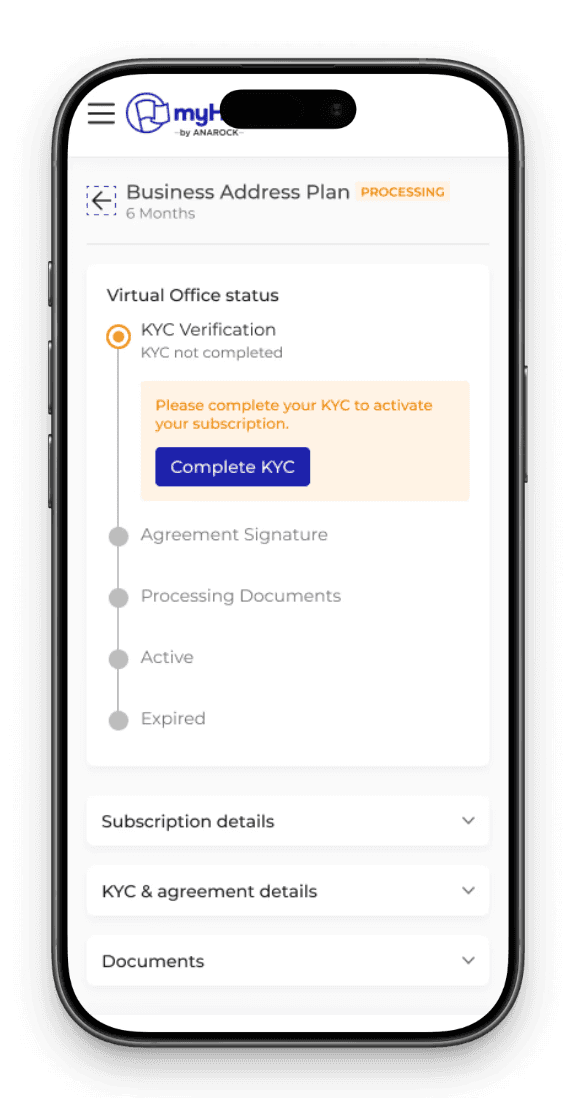
Users had no visibility into what happens after purchase
KYC, document checks, and agreements happened via email/WhatsApp
No progress tracking for required documents or timelines
Solution:
Clear post-purchase flow with step-by-step guidance
Checklist for KYC, documents, and agreements
Status tracking to show “what’s pending” & “what’s next”
⏳
Slow & Error-Prone Onboarding
Every step of the process required ops or sales intervention
High document rejections due to unclear instructions
Agreement signing relied on manual coordination and follow-ups
Solution:
Self-serve onboarding with clear instructions and formats
Digital agreement signing and structured document upload
Reduced dependency on ops through guided flows
🧩
Fragmented Systems & Multiple Stakeholders
No unified portal for users, ops, or partners
Ops tracked progress via spreadsheets, calls, and emails
Partners lacked tools to manage multiple clients
Solution:
Unified onboarding platform for stakeholders
Centralized visibility into onboarding and activation
Partner-friendly workflows to handle multiple accounts
😕
Inconsistent Activation Experience
Activation timelines varied based on ops workload
Heavy reliance on manual reminders
Users frequently contacted support for status updates
Solution:
Standardized activation milestones and timelines
Automated updates to reduce follow-ups
Clear “What happens next?” reassurance after purchase
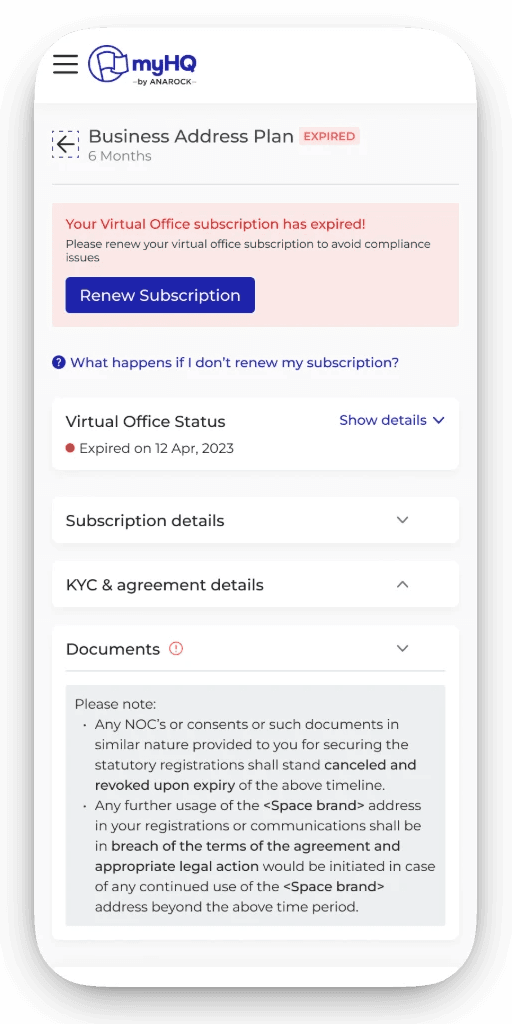
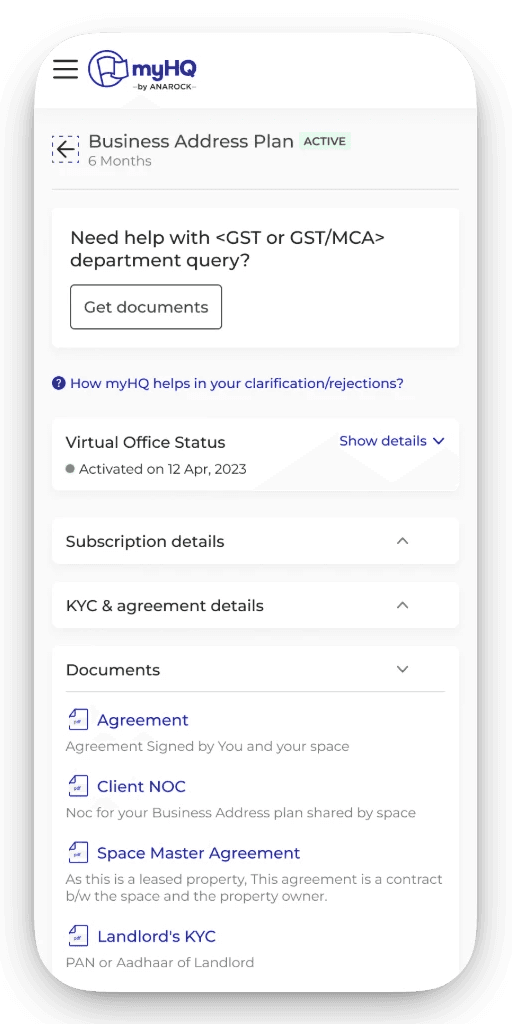
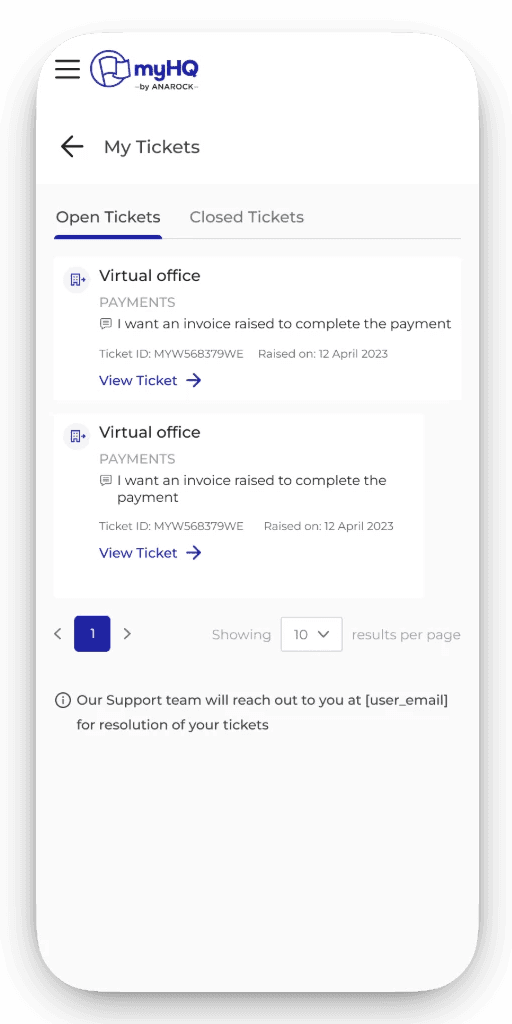
Digital Activation Process for the Virtual Office
Final outcome : Highlights
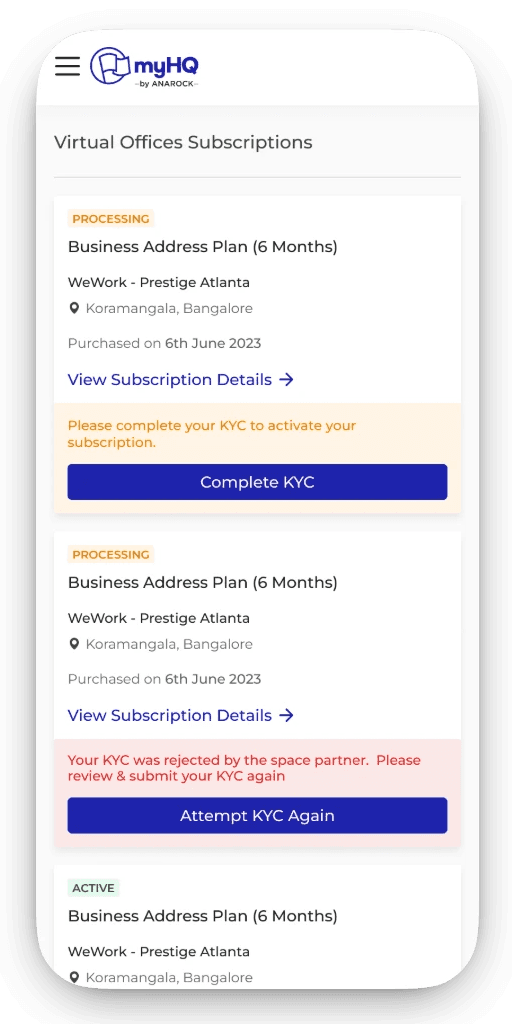
Subscription overview (all Virtual offices)
A single dashboard that gives users clear visibility and control over all their virtual office subscriptions.
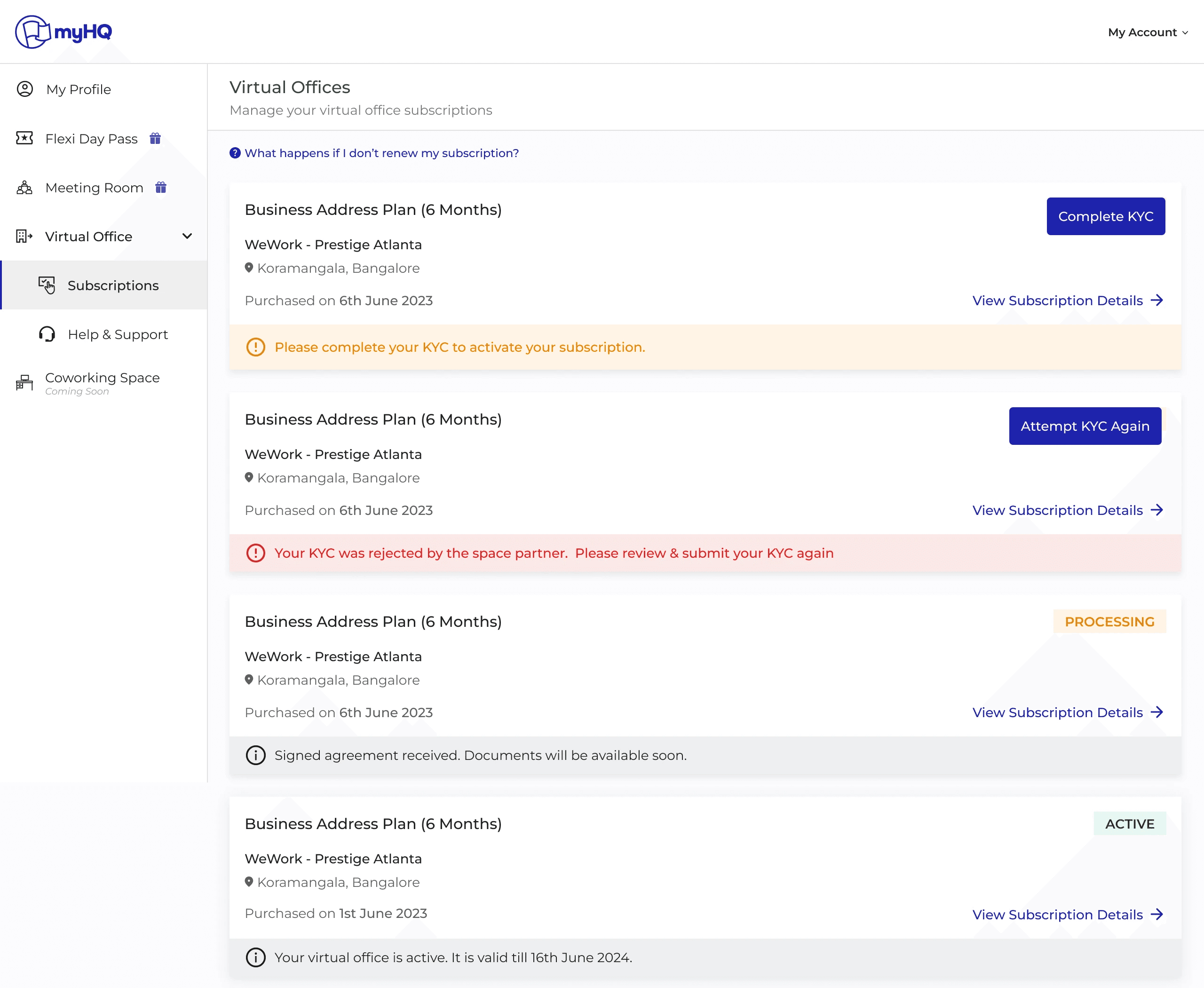
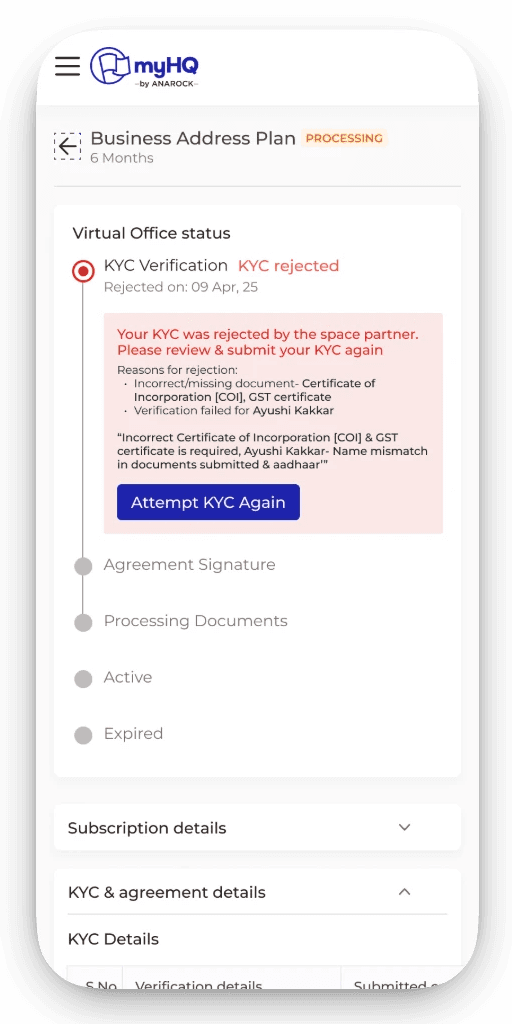
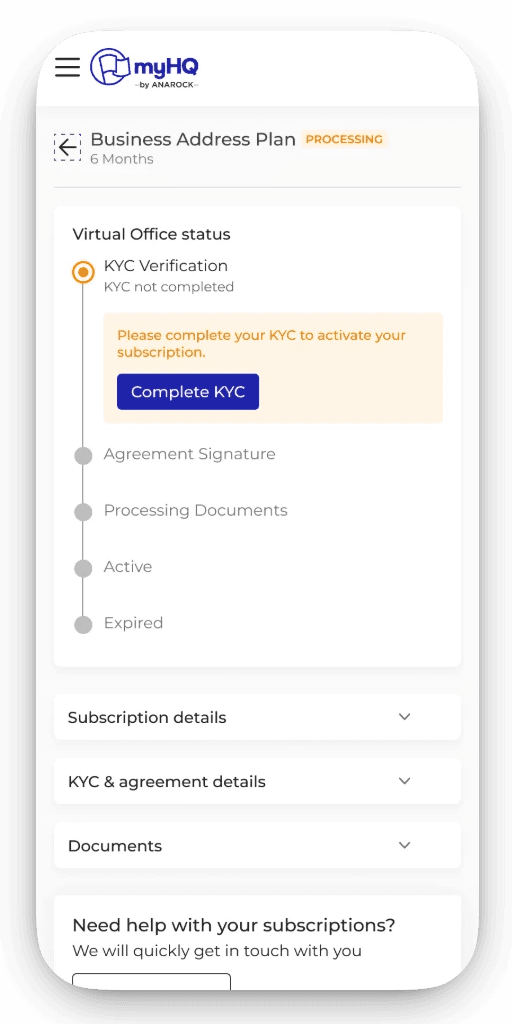
Subscription progress tracking
Step-by-step status tracking that sets expectations and removes post-payment uncertainty.
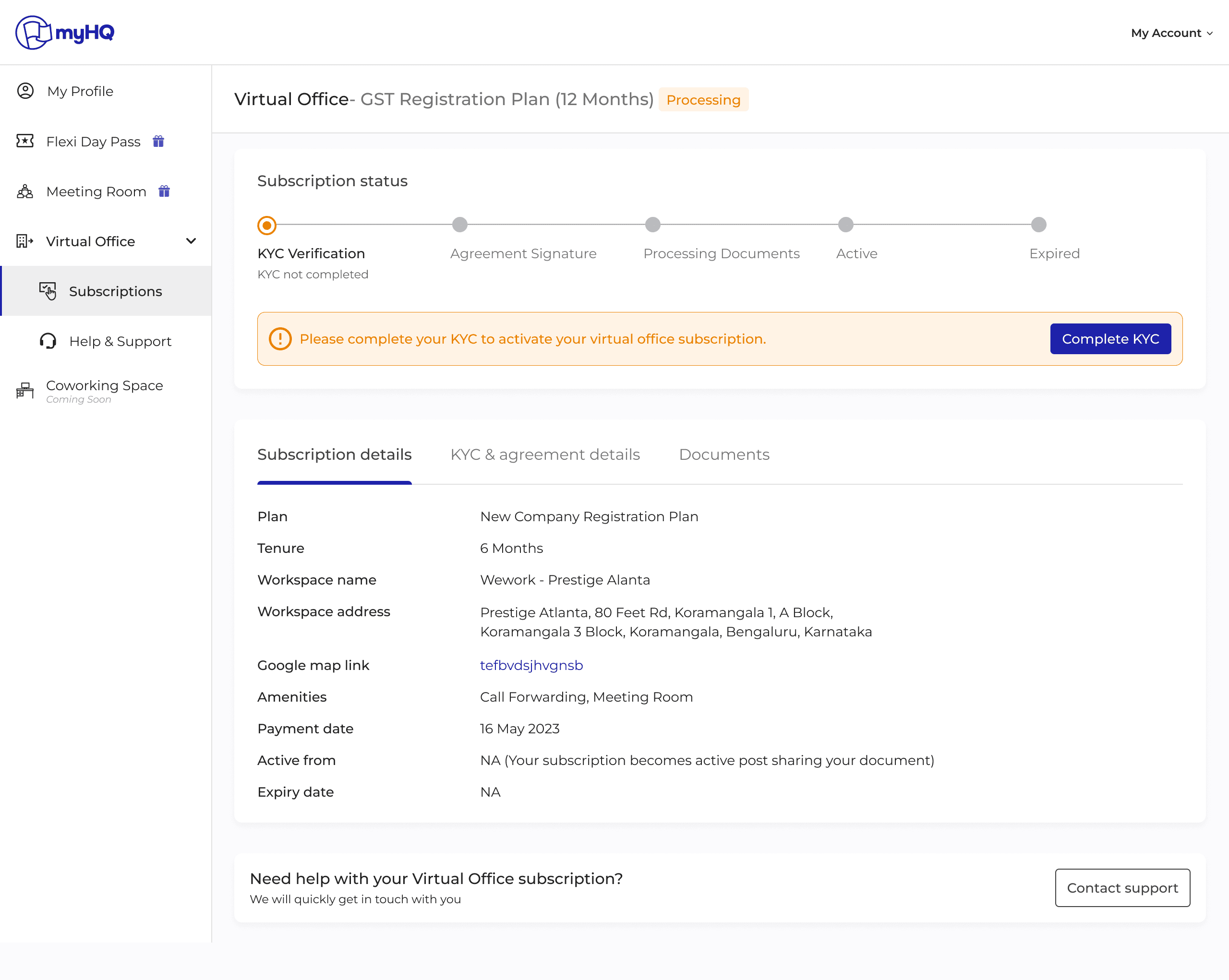
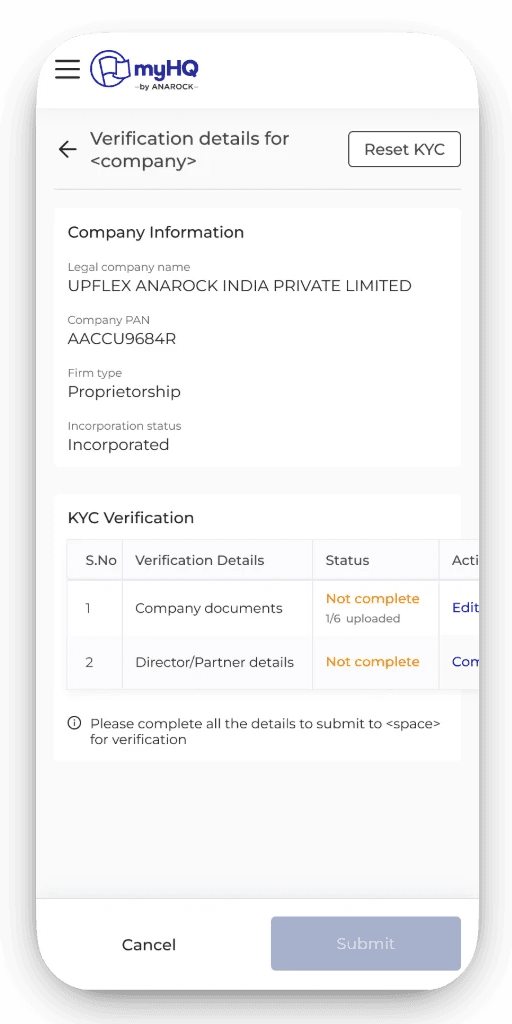
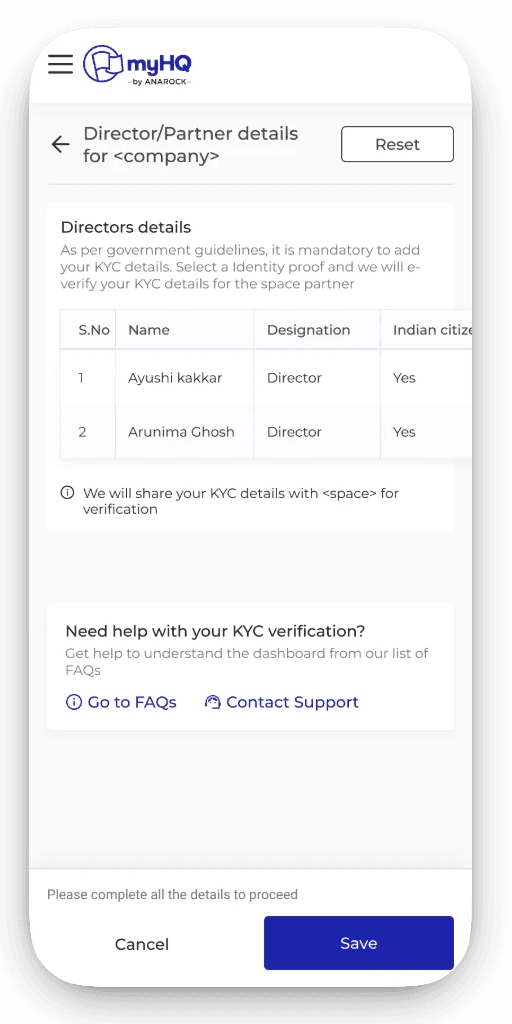
KYC activation
Guided, error-aware KYC flow that reduces rejections and speeds up activation.
Help & support module
Contextual, self-serve support that resolves issues without relying on calls or follow-ups.
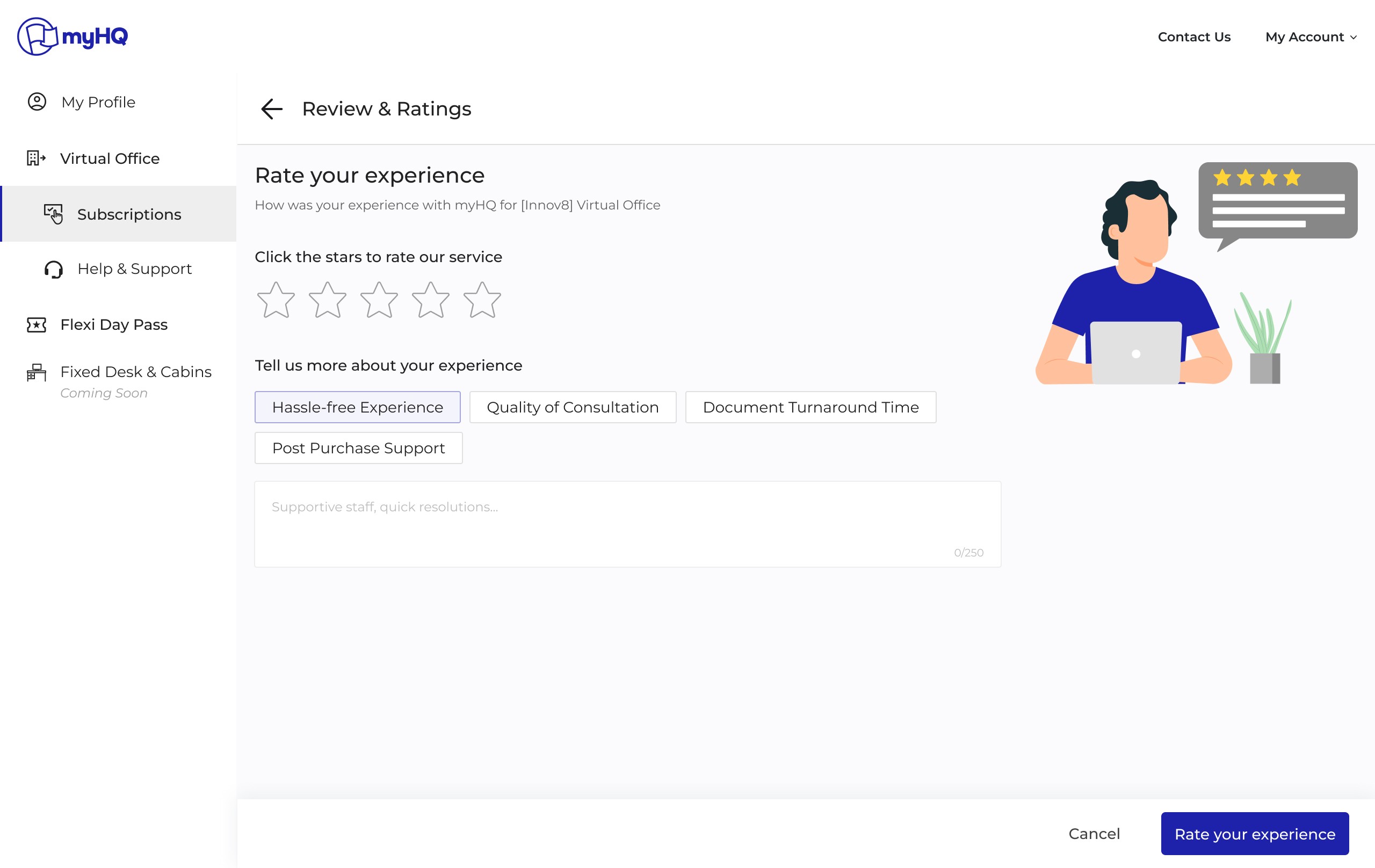
Review collection
Lightweight feedback capture to close the loop and continuously improve the onboarding experience
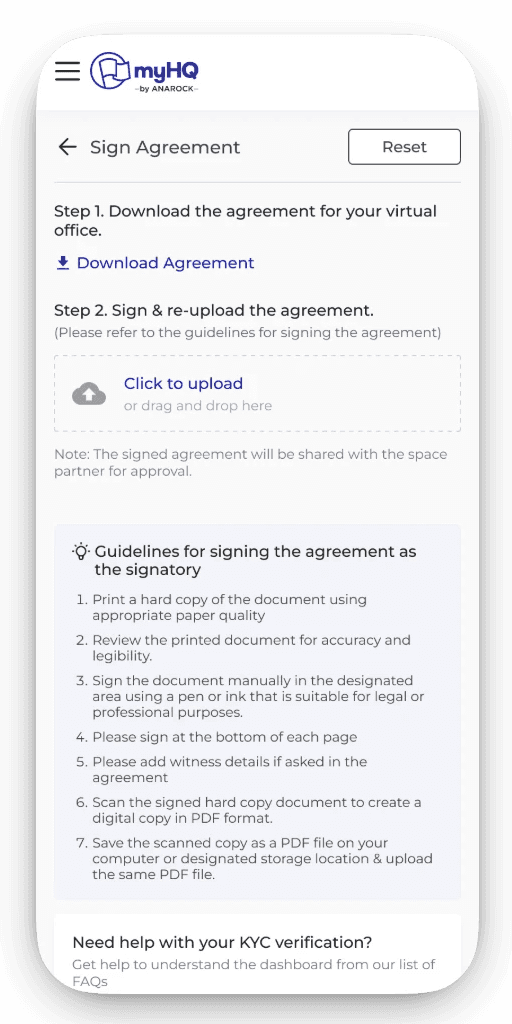
Mobile web experience
Usability testing & iterations
Through multiple rounds of usability testing & real data from the heat maps & feedbck, I uncovered key friction points that shaped the final onboarding experience. The insights gathered led to clearer guidance, reduced rework, and a far more predictable journey for every stakeholder involved. For example:
Usability test on 'KYC & agreement flow' through prototyping
Tested
KYC uploads, error states, agreement signing with 6 people from different departments
Insights:
Failures came from unclear instructions
Fixes:
Added inline validations
Sample files, previews & instructions wherever possible
Guidelines inside the upload step
Robust foundation for scalability — Beyond solving immediate operational bottlenecks, this work established a base for new features to be added faster, ensuring UI consistency, and creating a modular system that can support future expansions with minimal build effort. The redesigned user onboarding is now not just efficient, but future-ready, flexible, and capable of evolving as Virtual Office continues to grow across cities and use cases.
Thank you!